1
Create a read-only community (SNMP v2c)
Connect to the switch and enter configuration mode. Use a community string that isn't "public" or "private", and restrict it with an access list if the switch supports it.
enable
configure terminal
snmp-server community zyntyRO RO
snmp-server location "Branch - Lyon"
snmp-server contact netops@company.com
end
write memory
2
Or use SNMP v3 for stronger security
If your policy requires authentication and encryption rather than a plaintext community string, configure an SNMP v3 user instead.
configure terminal
snmp-server group ZYNTY-RO v3 priv
snmp-server user zynty-ro ZYNTY-RO v3 auth sha AuthPass123! priv aes 128 PrivPass456!
end
write memory
3
Confirm SNMP is reachable
From the collector's network segment, a quick SNMP walk confirms the switch is responding before you add it in Zynty.
snmpwalk -v2c -c zyntyRO 10.20.6.10 sysDescr.0
4
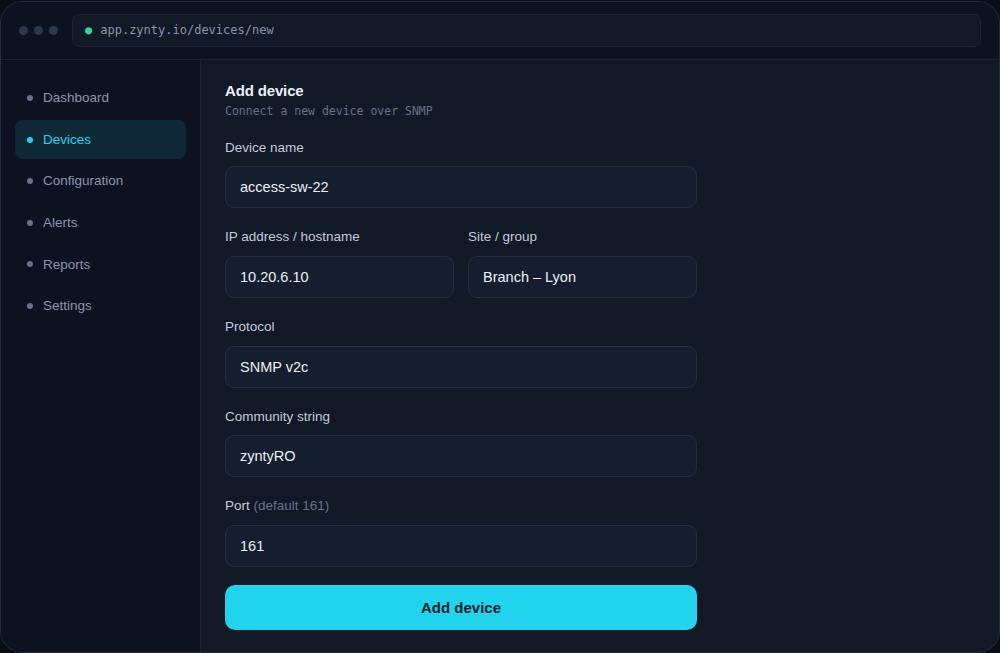
Add the switch in Zynty
Use SNMP v2c (or v3, matching what you configured) as the protocol, and enter the community string or v3 credentials exactly as configured on the switch.
1
2
Cisco IOS-XE devices use identical syntax. On very old IOS 12.x images, `write memory` may need to be `copy running-config startup-config` instead.